THE PENDING DRAFT

If there’s a market for premium channels like HBO, why wouldn’t there be a market for premium social networks like App.net?

The majority of users will always prefer the free option, so don’t expect a mass exodus from Twitter or Facebook for paid options like App.net. There will always be a contingent whose main concern is privacy or stability, however. As the only service intentionally catering to those users, App.net has a chance to become a heavyweight in its niche.

App.net is going to provide a new File API to developers. I agree with Jordan Koschei that there’s room for a premium social network. I for my part just signed up for my first year, and you should, too.

App.net is Building Out – The Industry.

Flat aesthetic is great. Skeuomorphism is fine too. It’s even okay to gush over sexy UI on Dribbble and explore aesthetic fads in your own work. Just don’t forget the other 90% of what makes a design comprehensively great.

Despite all the buzz about flat design we shouldn’t forget that aesthetics and the style of our designs are just one (small) part of a design.

Less Aesthetic, More Design | Wells Riley.

WordPress Conditional Tags for Beginners

January 31, 2013

Not long ago i didn’t have any plan how conditional statements in WordPress Themes work. I used them, even quite often to be honest. But it was mostly hacked together from different code snippets or other themes and if something didn’t work the way i wanted it was a very tedious task to find out whats wrong because i just didn’t get it.

But in the end, it’s not that complicated as it may look. So, let me try to explain how they work in simple terms.

What’s a Conditional Tag?

A conditional statement checks for a certain “condition” and outputs something if this condition is true. For example you have a function which outputs something, but you only want it on the front-page, or you want to have a different output on the front-page than you have on other pages. You can also check for way more complicated stuff, but for the sake of sanity let’s stick to an easy example. Show something, but only on the front page.

Luckily, there are lots of predefined conditional statements provided by WordPress. We use ‘<?php is_home();’ which we wrap up in a simple if/else statement to check if we are on the home page.

<?php
    if (is_home() ) {
        // OUTPUT ON THE HOME PAGE
    } else {
        // OUTPUT ON ANY OTHER PAGE
    }
?>

Some conditionals work just like that (like is_home), others accept optional parameters (e.g. is_single) and some even require parameters in order to work.

To check if we are on a single Post, Attachment or Custom Post Type page (basically everything which uses the single.php Template) we can simply use:

<?php
    if (is_single() ) {
        // OUTPUT ON SINGLE POST PAGES
    } else {
        // OUTPUT ON ANY OTHER PAGE
    }
?>

But maybe we wanna target just the post titled “Our super special Post”, that’s possible too.

<?php
    if (is_single( 'Our super special Post' ) ) {
        // OUTPUT ON OUR SUPER SPECIAL POST PAGE
    } else {
        // OUTPUT ON ANY OTHER PAGE
    }
?>

Of course you can also use if/else/elseif to check multiple things at the same time. So, to finish this little introduction, let’s combine all of the above in one sentence:

<?php
    if (is_home() ) {
        // OUTPUT ON THE HOME PAGE
    } elseif (is_single( 'Our super special Post' ) ) {
        // OUTPUT ON OUR SUPER SPECIAL POST PAGE
    } elseif (is_single() ) {
        // OUTPUT ON ANY OTHER SINGLE POST PAGE
    } else {
        // OUTPUT ON ANY OTHER PAGE
    }
?>

As said before, there are plenty of conditionals ready to be used, browse the Conditionals in the WP Codex to find out how to use them or if they accept/require parameters etc. Once you understood how they work, you can do really cool stuff with them.

Use the comments, if you’ve got any questions or if i missed something.
When you want a click to change something on your page, you usually reach for Javascript. Adhering to principles of modularity and separating structure, presentation, and behavior we’re supposed to use Javascript for behavior layer. However, methods exist for generating click events using only html and css. What are they and should we use them?

An interesting article about using CSS Click events instead of JavaScript. Steven Bradley walks through different ways of adding CSS click events, from pseudo-selectors like :target/:active to other more “hacky” things you can do with checkboxes or radio input fields. Personally i think the best way to add click events remains Javascript, but CSS is certainly moving more and more in a direction where we can use stuff like this without any hacks. And that is a good thing.

How To Generate CSS Click Events And Thoughts About Whether You Should – Vanseo Design.

How I Learnt to Code in One Year David Bauer. Journalist+

January 30, 2013

When I started my quest, my goal was not to apply for an engineering job at Facebook. I wanted to broaden my horizon as a journalist, unlock new possibilities and simply learn something new. That’s why I will state confidently: It was worth the effort. Learning how to code is rewarding, I recommend doing it. At the same time, my answer to whether journalists should be able to code has become more nuanced. More on that later.

David Bauer is a swiss journalist who set his goal for 2012 to “Learn to code in a year” with CodeYear. It is debatable if and why a journalist needs to know coding at all but i think he makes some pretty good and reasonable points about that at the end.

I just started some JavaScript lessons in CodeAcademy some weeks ago and it is inspiring and motivating to see how someone was able to go from zero to build something like Instacurate in just about a year. Congratulations and thank’s for your insights David Bauer.

How I Learnt to Code in One Year David Bauer. Journalist+.

moom – Move and zoom windows

January 30, 2013

moom_01

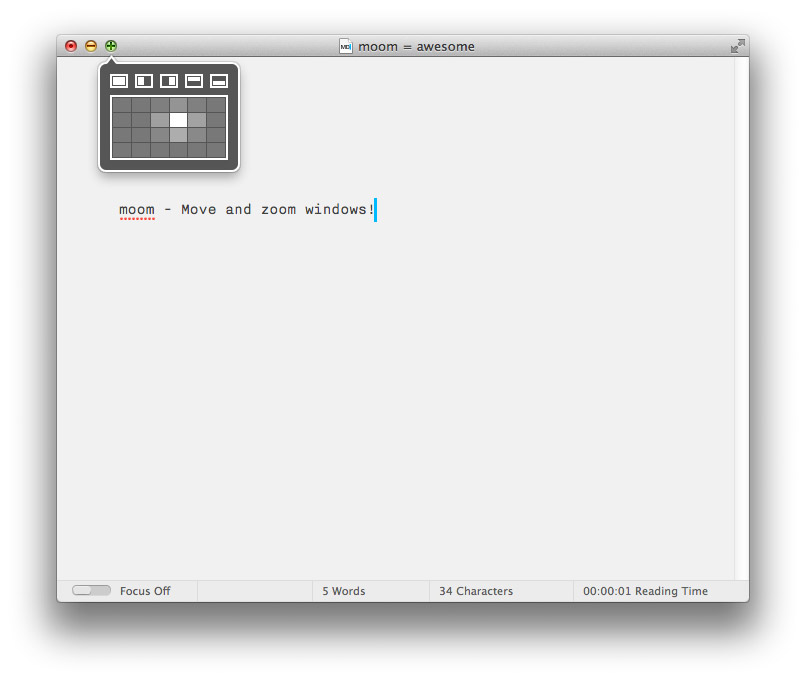
If you’re like me, you normally have tons of windows open while working. This leads to a lot of clicking back and forth, rearranging your windows. Yesterday i found this little helper called “moom – Move and zoom windows”.

Once installed you get a nice little pop-up when you hover over the green zoom button. Now you can zoom not only to full screen, but also to the left, right, top or bottom half of your monitor. Very handy.

And if this isn’t enough you can also activate a little grid view to exactly choose the region of your screen where you want your window. Simple but extremely timesaving. There are many other features and settings to configure it even more.

You can download a demo version which gives you 100 “moom’s” and the full version is 10$. Money well spent if you ask me.

Go try it for yourself!

In one of the most heartfelt movies I’ve ever watched, a young boy named Trevor receives an unusual class assignment: he must come up with a practical way to make the world a better place. His idea is simple, yet brilliant: do an exceptional favour for three different people without being asked, and then – instead of paying it back – ask them to do the same for three others. He calls it “pay it forward”.

I ‘cant help but draw comparisons between Trevor’s Theory and the principles powering the web.

Kay Brach – Offscreen Mag No3

As explained by Wikipedia, the Ouroboros is “an ancient symbol depicting a serpent or dragon eating its own tail.” That seemed like an appropriate name. Figured it had to be better than calling it “ui-spinner”.

An interesting Sass/CSS Loading Spinner technique by Tom Genoni.

Ouroboros Sass/CSS Spinner : Atomeye.

Who owns WordPress? or How to Make Money in a GPL Universe. – Design is Philosophy

January 29, 2013

This is fundamentally different from general commerce and normal software licenses. And when you try to apply general commerce principles to GPL products, things get messed up in a hurry. The whole revenue model and philosophy of cost-per-item simply doesn’t work under GPL because the product itself is free. In place of the product being the commodity, it is the service that is sold.

If you work with WordPress and were not living under a rock for the past week, you’ve heard of the “GPL-War” going on between Envato authors and the WordPress Foundation. It all started (again) with Jake Caputo being banned from speaking at a WordCamp because he sells his themes on envato’s Themeforest, which isn’t fully GPL-compatible. Lots have been written about it, WPdaily did a good job in covering the whole story and opinions from different angles.

In this article on Design is Philosophy Morten Rand-Hendriksen raises the questions about who owns WordPress and how one can still earn money in a GPL-World. It’s all about services instead of licenses. Worth a read!

Who owns WordPress? or How to Make Money in a GPL Universe. – Design is Philosophy.

Ultimately performance is about respect. Respect your users’ time and they will be more likely to walk away with a positive experience. Good performance is good design. It’s time we treat it as such.

Couldn’t agree more. Think about performance on an early stage of a project and make it a primary goal of your design.

Performance As Design.