
THE PENDING DRAFT

A Dao of Web Design – A list apart

November 30, 2013

It’s hard to believe this article is 13 years old!

The web’s greatest strength, I believe, is often seen as a limitation, as a defect. It is the nature of the web to be flexible, and it should be our role as designers and developers to embrace this flexibility, and produce pages which, by being flexible, are accessible to all.

A Dao of Web Design – An a list apart article

html5 Doctor: Responsive images – end of year report

November 29, 2013

Bruce Lawson wrote a nice overview of all the different proposed solutions for truly responsive images. From picture to srcset to src-N there where a lot of good ideas and while we’re not there yet, i’ve got hope that we will have a proper solution in 2014.

Given that src-N addresses more usecases than WebKit’s proposed dpi-switching srcset and the similarity of syntax, I wish WebKit would simply alias their nightly code and ship the minimal dpi-switching src-N given above (so src-1 instead of srcset) and argue about discuss extending it later.

+1 for that!

html5 Doctor: Responsive images – end of year report

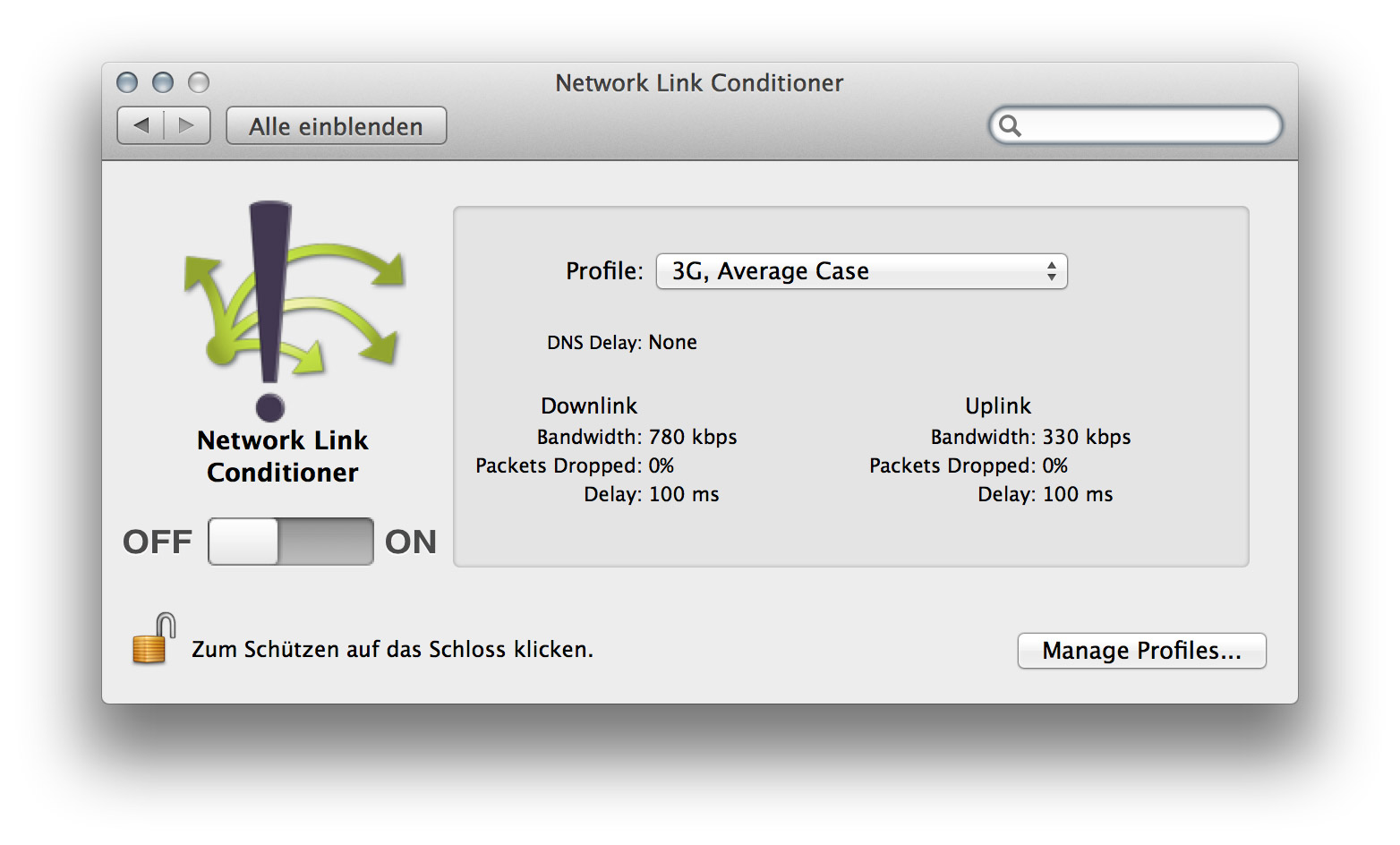
Simulate slower Network Connections with the Network Link Conditioner

September 9, 2013

Network Link Conditioner


As more and more people will access your final work on Tablets, Phones and even Laptops with less-than-optimal speed, it is important to test your pages performance on slower network connections. There’s a very handy little tool in Apple’s Developer Tools, which let you set the Connection Speed of your Mac to simulate the average 3G or Edge Network.

To install this preference pane you need to open Xcode, go to the Xcode Menu and choose “Open Developer Tool” and then “More Developer Tools…”, this will take you to the Apple Developer site. Login and then download the “Hardware IO Tools for Xcode” which will download a dmg which contains the Network Link Conditioner, amongst other tools.

Remote Debugging for iOS Devices with Safari

August 25, 2013

I was pretty impressed when i first saw how Ghostlab enables us to remotely debug a design on a mobile device. While Ghostlab can do many other things, remote debugging on an iOS device is also possible directly from within Safari. I’m honestly not sure if this is a new feature or not, but it’s very cool and pretty easy to use.

1. Connect your device via USB
2. On your iPhone, go to Settings / Safari / Advanced and activate “Web Information”
3. On OS X, open Safari and activate the dev tools
4. Open any website on your iOS Device
5. Now you should see your device(s) in the Menu “Developer” in Safari form where you can access the Web Inspector for any open site on your iOS device.

As far as i found out, this is only possible with iOS 6 and up and Safari on a Mac. There’s a similar function in Chrome to remotely debug on Android devices, which i haven’t tried yet, but looks exactly the same.

Ghostlab – Synchronized testing for web and mobile.

August 15, 2013

Ghostlab by Vanamco

If you design or develop for mobile devices you might know the hassle to get a local installation on different devices.

My testing usually covers IE7-9 on Windows via Parallels Desktop, FireFox, Chrome and Safari on Mac OS X, iPhone, iPad and Chrome on a Nexus 7 Android Tablet. To get the same site on all those Systems is possible but not what you would call convenient.

Thats where Ghostlab comes into play. It generates a local “server” which you can access via a local IP address and it works perfectly to view (for example) my local WordPress development installation live on all my devices as well as on Windows under Parallels Desktop. On top of that it syncs your actions, whether they are on your desktop or mobile, so everything you click, scroll or touch will be synced on all devices. Cool stuff.

“Ok, but setup a server on OS X to test on several devices locally isn’t THAT hard, and i don’t need this fancy syncing stuff”, you might say. Yes, but it doesn’t stop there, it also gives you the ability to use Web Inspector with your Mobile Devices. Yes, you heard it right! Inspect your CSS Styles. On your Mobile Device.

Oh, and as a bonus, Ghostlab shows you a QR-Code so you don’t have to type in the IP address manually on your mobile devices, which may be the first example of a QR-code which does something more than wasting space.

The App is developed by Vanamco AG in Zurich and can be bought for 49$ from their website, which is a very fair price if you consider how much time and nerves this little thingy will save you. Of course you can also download a demo version, which i suggest you to do now.

Ghostlab by Vanamco AG
Brad Frost on Bullshit

August 12, 2013

Great Presentation by Brad Frost talking about bullshit in our information overflowed world today.

Adobe Brackets: From Design Comp To Code

June 20, 2013

This looks pretty smart. I never really got used to slicing my designs from Photoshop so normally i just create all assets manually. Not very professional, i know. But maybe it’s time to give it another try.

Out of the approximately 10,000 news stories you have read in the last 12 months, name one that – because you consumed it – allowed you to make a better decision about a serious matter affecting your life, your career or your business. The point is: the consumption of news is irrelevant to you. But people find it very difficult to recognise what’s relevant.

A good article about how news affect our brains and our ability to concentrate and eventually to think. Would be an interesting experiment to stop reading daily news and focus more on books and long form articles for at least a month or so. Maybe i’ll give it a try.

News is bad for you – and giving up reading it will make you happier | Media | The Guardian.

It’s easy to move the cursor from Amazon’s main dropdown to its submenus. You won’t run into the bootstrap bug. They get away with this by detecting the direction of the cursor’s path.

Ben Kamens (lead dev at Khan Academy) takes a look at how Amazon handles their Mega-Dropdown.

He even wrote a little jQuery Plugin and shared it on GitHub.

Breaking down Amazon’s mega dropdown – Ben Kamens.