Typography Supply
January 11, 2016An inventory of typographic tools.
Some nice tools for Typography on the Web.
An inventory of typographic tools.
Some nice tools for Typography on the Web.
If you’re working with OS X you will possibly like this extensive list of awesome commands.
A niche WordPress Theme by Adem Ilter that uses IFTTT recipes to stream social media activity from various resources into one place. Great idea and nicely executed. Check out the live demo here.
SocialCrumbs: A Free WordPress Theme that Streams Social Activity Using IFTTT Recipes
Fully-featured private Git repositories hosted on Google Cloud Platform. Browse, edit and commit repository files in our integrated source editor. Activate the Cloud Debugger to debug hosted applications during runtime.
Google quietly launched a GitHub competitor. Could be an interesting option, if you need hosting for private repositories and don’t want or can’t pay for a GitHub Account.
The Mobile Checker is a tool for Web developers who want to make their Web page or Web app work better on mobile devices.
The W3C released a tool to check your mobile websites. Pretty sweet.
Proper debugging and unit testing are both very high on my list of things i need to get my head around and implement into my development workflow as soon as possible. Luckily, there are people like Jonathan Christopher who wrote this great introduction on how to use Xdebug for WordPress Development.
He goes into great detail on how to install and configure Xdebug with MAMP (Pro) and use it with either a separate application or right inside an IDE.
Monday by Noon – Improving Your Process: WordPress Development Using Xdebug
Premium WordPress plugins have a price and are ineligible for the official plugin directory. Pro Plugin Directory is a place to discover premium WordPress plugins. 100% GPL.
A growing directory of Premium WordPress Plugins.
Daniel Bishop shares how he built his custom Device Lab to mount Mobile Devices for Testing. Maybe i should give this a try somewhen, too.
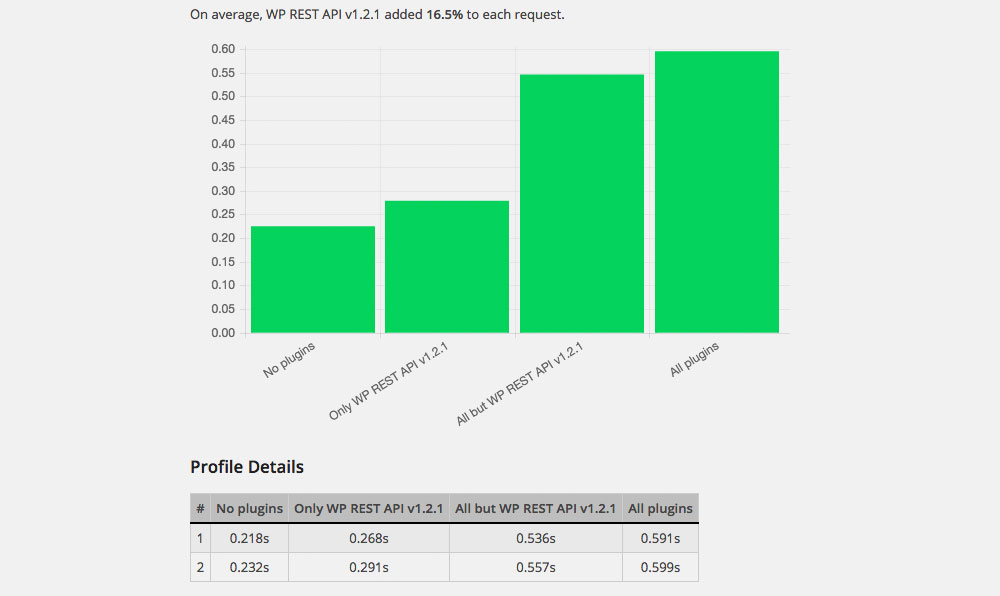
Contrary to popular belief, adding plugins to your WordPress site is not necessarily harmful to the performance of your page. One “bad” plugin alone can potentially bring your site down while the site can run smooth with a 100 installed plugins. It all depends on which plugins you install and how they are built.
Luckily, there are tools like this little plugin i just found called Plugin Profiler by Danny van Kooten. It measures the loading time with all plugins deactivated, all activated and both in combination with a plugin you specifically choose.
The only thing you need to do for it to work properly is manually add a file in your mu-plugins folder and after that it’s really easy to use. Choose which plugin you want to check and how many test-runs you’d like and let it do it’s work. Kinda like magic.
I don’t know how accurate the results are and what exactly is going on under the hood to measure them, but i’m sure it’s a good indicator if something is going wrong with a plugin.
What do you use to check Plugin Performance before installing/activating?
A nice collection of resources and Cheat Sheets on many different aspects of web design. I already found something interesting in there: Sauce Labs, which could be a cheaper alternative to my (fairly underused) BrowserStack Account.