THE PENDING DRAFT

Apply Filters – A WordPress Development Podcast

August 23, 2013

applyfilters

Brad Touesnard and Pippin Williamson launched a new Podcast about WordPress Development. It is focused solely on Developing and Coding for WordPress, so they don’t have to “worry about annoying the non-developer listeners in the audience”, in their own words.

Here’s what they have to say about Apply Filters in the description:

Our discussions will include everything from development in WordPress core, plugins, and themes. We will be sharing much of our own experiences as developers that work fulltime in WordPress development, as well as bringing on guest developers to share their stories.

But don’t be afraid of that, i would consider myself more of a designer than a coder and still really enjoyed the first episode and looking forward to the next one.

Brad Touesnard is the founder of Delicious Brains, the company behind such great plugins as WP Migrate DB Pro, a plugin to easily migrate your WordPress databases.

Pippin Williamson is the head of Pippins Plugins and creator of many popular plugins such as Easy Digital Downloads or Restrict Content Pro. He also reviews plugins for the official WordPress.org plugin repository and contributes to WordPress core and bbPress.

I even learned something new right in the first episode when they talked about a new function get_attached_media(), which was introduced in WP 3.6. As the name suggests, it loads all media attached to a particular post, which always was a bit hacky to do in the past and it’s good to know there’s a better way by now.

If you’re into WordPress Development, whether as a Theme Designer or a Plugin Developer and want to learn a new trick or two, go check them out.
Apply Filters – WordPress Development Podcast

mobble WordPress Plugin detects different mobile devices

August 12, 2013

Just stumbled upon this neat little plugin which promises to provide conditional functions which can be used to identify different devices easily.

Helper plugin that provides conditional functions for detecting a variety of mobile devices & tablets. Perfect accompaniment to CSS Media Queries.

I didn’t have the time to completely try it out right now, but it sounds very promising from the description. What it does is checking which device is in use using PHP class Mobile_Detect and provide us with conditional functions in the form of “is_mobile()” or “is_tablet()” etc. so we can display different stuff depending on the device.

As we already have the ability to generate, let’s say, different image sizes when uploading an image, this seems to be a very easy and logical solution. One concern that comes to my mind is if and how it will perform with caching. The developer – Scott Evans –  addresses this issue in the FAQs:

Please note that in certain setups caching will cause undesired behaviour. If your cache is set too aggressively PHP will be skipped and the device detection will not work.

Anyone using this plugin already? Do i miss something important? Better alternatives? Let us know what you think in the comments.

mobble – Download in the WordPress.org Plugin Directory

Release Post from Scott Evans with more Info and some Examples

When we develop sites for clients, sometimes it makes sense to remove some of the UI items they don’t need in the admin area to make it less intimidating. We used many of these admin customizations with WordPress Multisite (or WPMU), to make our customer’s sites more user-friendly. (The code in this article works with normal WP and multisite)

Some handy tipps on how to customize the WordPress Dashboard for your clients.

How to Simplify & Customize the WordPress admin | Press Coders.

Michelle Schulp redesigned the WordPress Template Hierarchy to make it easier to use. Based on her design, Rami Abraham already created an HTML Version. I think they both did a very good job and i am sure this will find it’s way into the Codex sooner or later.

As a person with a passion for infographics and simplifying the display of data, I am always looking for ways to make information more clear. The world is filled with an ever-increasing amount of data, but this data is only useful to us if it is usable. A well designed infographic makes even the most complex ideas understandable, but a poorly designed infographic can make simple ideas needlessly confusing. It is this exact usability issue that plagues most infographics today, even within a place I seem to be spending an ever-increasing amount of my time: the WordPress Codex.

Redesigning The WordPress Template Hierarchy – Marktime Media.

Creating a high quality WordPress Theme is about more than just a nice design. What’s going on under the hood is equally important: using the right Template files, writing clean code and testing for all kinds of content.

Luckily there is a wealth of information, plugins and other helpful tools available on the web. This is an overview of the best resources to help you develop Themes according to the best practices.

Fränk Klein composed a handy list of resources on WordPress Theme Development Best Practices. Definitely something to bookmark.

WordPress Theme Development Best Practices – Fränk Klein.

Pressgr.am

March 17, 2013

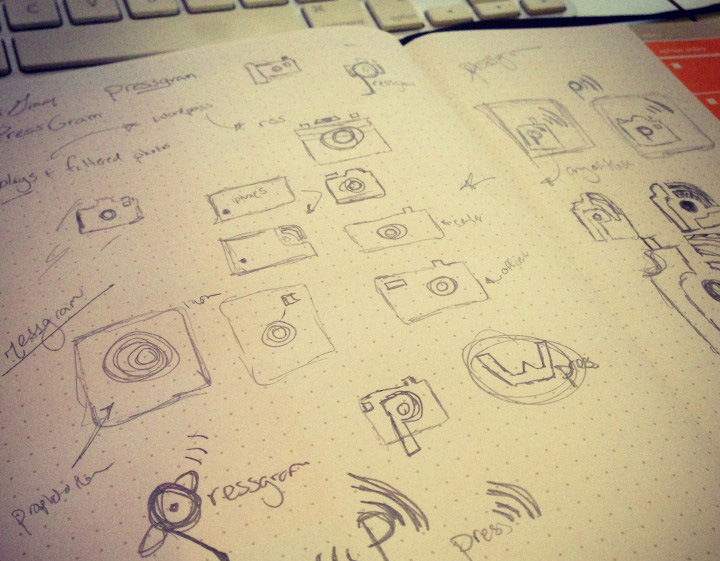
Pressgram Logo Sketches

There was a lot of rumble when Instagram changed their licensing somewhen last year. I never used Instagram for myself, but i know that a lot of creative people left frustrated because of that. Some of them completely stopped sharing images on social networks, some where moving (back) to flickr or to 500px, which might be somewhat better in terms of licensing, but still are third party solution.

I thought there has to be a way to solve this with WordPress and searched for Apps/Plugins etc. but i couldn’t find what i was looking for. If there only was an app, kind of like Instagram or flickr, which would let us connect and share our images directly to our own WordPress Installations, instead of a third party service. It would let us build our own Photo Stream, our own Instagrams, completely self-controlled and not depending on someone else. It would be awesome.

(more…)

This guide is for anyone interested in making the best possible WordPress themes. Each public theme on WordPress.com is tested against these guidelines to ensure the highest quality. This includes security, plugin compatibility, and support for a wide variety of user-generated content.

The Theme Team at Automattic released this handy Theme Guide for WordPress.com-Themes which every theme is tested against before it gets released. I would love to see something like this grow into a complete best practices guide for themes, both for WordPress.com as well as WordPress.org

Theme Guide | Developer Resources.